Table Of Contents
1.
Introduction................................................................................................................... 3
1.1. Project
Description.................................................................................................. 3
1.2. The Scrabble Game................................................................................................. 3
1.2.1. The Desk
Version.............................................................................................. 3
1.2.2. The ‘Scrabble
in Java’ Version............................................................................ 4
2. The ‘Scrabble in
Java’ Application.................................................................................... 5
2.1. Program Structure................................................................................................... 5
2.2. Main Algorithms...................................................................................................... 9
2.2.1. Animator........................................................................................................... 9
2.2.2. Chat................................................................................................................. 9
2.2.3. Dictionary......................................................................................................... 9
2.2.4. Drag & Drop.................................................................................................... 10
2.2.5. Help Files....................................................................................................... 11
2.2.6. Image Buttons................................................................................................. 11
2.2.7. Loading Images............................................................................................... 12
2.2.8. Loading &
Saving a game................................................................................. 12
2.2.9. Receptionist.................................................................................................... 13
2.2.10. Scrollbars...................................................................................................... 14
2.2.11. Timer............................................................................................................ 14
2.3. The Communication
Protocol.................................................................................. 16
2.3.1. The sockets.................................................................................................... 16
2.3.2. Sending
messages.......................................................................................... 16
2.3.3. Handling
disconnection.................................................................................... 16
2.3.4. When game data
changes................................................................................ 16
2.3.5. When a new turn
data need to be sent............................................................... 16
2.3.6. Errors during
data traffic................................................................................... 17
2.4. Data Structures..................................................................................................... 18
2.5. Classes Overview................................................................................................... 19
2.5.1. AboutDialog.................................................................................................... 19
2.5.2. Board............................................................................................................. 19
2.5.3.
ButtonDescription............................................................................................ 19
2.5.4. C.................................................................................................................... 20
2.5.5. ChatArea........................................................................................................ 20
2.5.6. CheckDictionary.............................................................................................. 21
2.5.7. CheckWords................................................................................................... 21
2.5.8. ChooseDialog.................................................................................................. 21
2.5.9. Client.............................................................................................................. 22
2.5.10. ClientData..................................................................................................... 22
2.5.11. ClientHandler................................................................................................. 23
2.5.12. ClientOrServer............................................................................................... 23
2.5.13. ConnectDialog............................................................................................... 24
2.5.14. ImageButton.................................................................................................. 24
2.5.15. Mail.............................................................................................................. 25
2.5.16. MultiServer.................................................................................................... 25
2.5.17. PlayerName.................................................................................................. 26
2.5.18.
ProgressBarTimer.......................................................................................... 26
2.5.19.
PropertiesDialog............................................................................................ 27
2.5.20. QuitDialog..................................................................................................... 27
2.5.21. Receptionist.................................................................................................. 28
2.5.22. Score............................................................................................................ 28
2.5.23. ScoreOfPlayers............................................................................................. 28
2.5.24. ScorePanel................................................................................................... 29
2.5.25. Scrabble....................................................................................................... 29
2.5.26. ScrabbleBoard............................................................................................... 30
2.5.27. ScrollingPanel............................................................................................... 30
2.5.28. ServerData.................................................................................................... 31
2.5.29. Spinner......................................................................................................... 32
2.5.30. StatusBarPanel............................................................................................. 32
2.5.31. StatusField.................................................................................................... 33
2.5.32. Timer............................................................................................................ 33
2.5.33. ToolBarPanel................................................................................................. 33
2.5.34. TurnTimer...................................................................................................... 34
2.5.35. Symantec
classes......................................................................................... 34
3. User’s Manual............................................................................................................. 35
3.1. Graphical User
Interface (GUI)................................................................................. 35
3.1.1. Toolbar........................................................................................................... 35
3.1.2. Status bar....................................................................................................... 35
3.1.3. Chat area........................................................................................................ 35
3.1.4. Score of
Players.............................................................................................. 35
3.1.5. Score details................................................................................................... 35
3.1.6. Play Board...................................................................................................... 36
3.2. The Menus............................................................................................................ 37
3.2.1. File................................................................................................................. 37
3.2.2. Game............................................................................................................. 38
3.2.3. Connect.......................................................................................................... 38
3.2.4. Settings.......................................................................................................... 39
3.2.5. Help............................................................................................................... 40
3.3. Playing ‘Scrabble
in Java’ – typical scenario............................................................. 41
4. Summary and
Conclusions........................................................................................... 42
4.1. Software
Limitations............................................................................................... 42
4.1.1. The
difficulties using the java.net.ServerSocket.................................................. 42
4.1.2. Dialog windows................................................................................................ 42
4.1.3. Drag & Drop
using java.awt.Window.................................................................. 42
4.1.4. Garbage
Collector............................................................................................ 43
4.1.5. Compatibility................................................................................................... 43
4.1.6. Portability....................................................................................................... 43
4.2. Conclusions.......................................................................................................... 44
The
goal of the project was to create a network computer game, based on the widely
known Scrabble game, using the Java programming language. The game can be
played simultaneously by up to 4 players via a network.
Special
features of the application:
·
Improved
Java GUI that includes toolbar, status bar and scrolling panels (application
can be resized to any size).
·
16
bit color graphics.
·
Communication
between players.
·
Possibility
to ‘Kick’ a player out of the game.
·
Word
checking with or without a dictionary (the server checks the words in a proper
dialog window).
·
The
maximum number of players can be changed before compiling the program (the
default is 4).
The
application was developed using Symantec Visual Cafe and Sun’s JDK1.0.2 under
the Microsoft NT/95 operating system.
Scrabble
is a widely known desk game, which is played on a 15x15 grid board, by up to 4
players. The game pieces are letter tiles, with a different score for each
letter. Each player gets 7 letters,
that should be placed on the board in order to form words. In each turn a
player can form several words by adding letters to the board. The player gets a
score for each valid word that he places on the board. A word score depends on
the score of its letters and on their location on the board. There are cells on
the board, which increase the score of letters (x2 or x3), or the score of the
whole word (x2 or x3).
Major
rules of the game:
1.
First
word must cover the center tile.
2.
Each
word must have at least one common letter with the previously placed words.
3.
Same
words may be placed many times on the board.
4.
All
words formed by new letters have to be approved by the dictionary or the server
player.
5.
The
words are read from left to right, and from top to bottom.
6.
If
a word is placed on some special squares, the effects are commutative with each
other (for instance, if a word is placed on a double word and a triple word,
then the score is *6 for that word).
7.
If
a player passes his turn, he gets 7 new letters.
8.
If
a player didn’t finish he’s turn before the time limit, he gets no new letters,
and the turn is passed to the next player.
The
‘Scrabble in Java’ application is based on the desk version of the game and
basically implements the same game rules.
The
game can be played by up to 4 players simultaneously, playing against each
other. In case of a single player, he
or she plays against the speller only - there is no computer player. Each player starts the Scrabble game on
his/her local computer, and is connected via a network.
Words
that are placed on the board can be checked in 2 ways:
1.
Internal
Speller (based on the Oxford dictionary).
2.
The
‘Server’ player.
Words
are checked from top to bottom and from left to right.
The
maximum number of players can be changed before compiling the program by
changing the variable MAX_NUM_OF_PLAYERS in C.java from 4 to the
desired number of players.
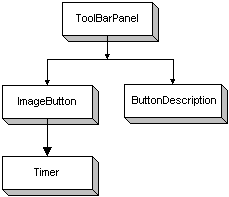
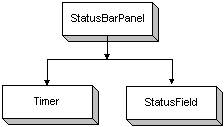
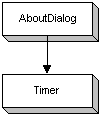
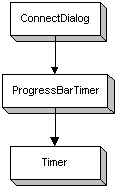
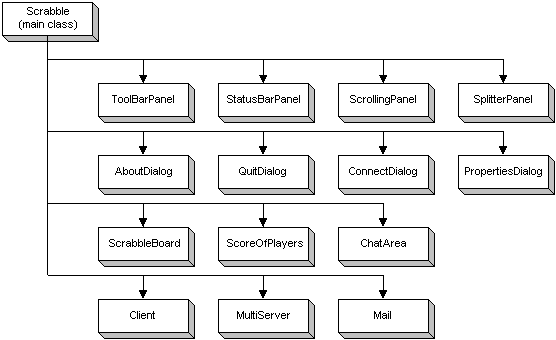
The
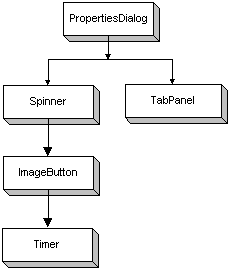
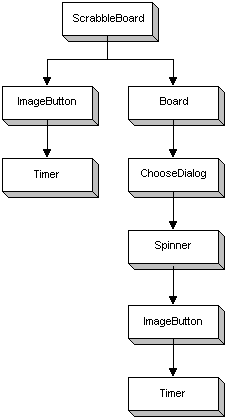
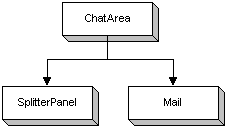
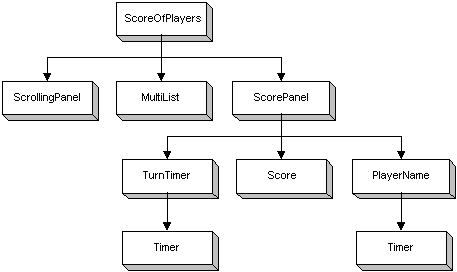
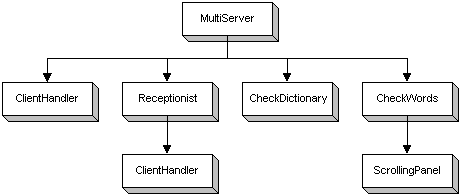
following figures show the different scrabble classes.
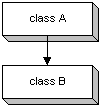
For
example, the figure above means that class A is the parent
of class B.
Runtime
r = Runtime.getRuntime();
try {
String[] temp = new String[2];
temp[0] = ClientData.browserPath;
// absolute path of the browser
temp[1] =
Scrabble.gameDirectory+"Help"+File.separator+"help.htm";
// absolute path of the help file
r.exec(temp); // run the desired browser with an html help
file.
}
catch(IOException e) {}
If
an IOException is caught, the browser path is probably invalid, and the
user is being prompt to update the browser location. The browser location can
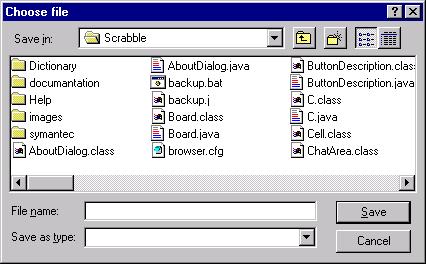
be updated using a menu option called ‘Browser location’, resulting in a java.awt.FileDialog
that enables the user to choose the browser executable file.
Image
buttons are basically like java.awt.Button buttons, with a few differences:
·
A
chosen image is being displayed on the button instead of just text.
·
If
the mouse is on the image button for a predefined amount of time (in the
current compilation - 0.5 seconds), the button throws an event representing
that. When the mouse leave the button, a representative event is also thrown.
This can be used to display a short description of the button, like in ToolBarPanel.java.
In
the ‘Scrabble in Java’ application, image buttons are implemented in ImageButton.java.
They appear in the application’s toolbar (ToolBarPanel.java) and on the
Scrabble playboard (ScrabbleBoard.java).
Further
information about image buttons can be found in the section: Classes Overview.
All
images in the program are being loaded using the same algorithm.
MediaTracker tracker = new MediaTracker(this);
Toolkit toolkit = getToolkit();
playboard = toolkit.getImage(---image
path---);
tracker.addImage(playboard,0);
try {
tracker.waitForAll();
} catch (InterruptedException e) {}
In
addition, the following code is added inside the paint() / update()
methods :
public
void update(Graphics g) {
if ( !tracker.checkAll() ) { // still loading images
g.clearRect(0,0,size().width,size().height);
} else { // all images were loaded
... desired code ...
}
}
The java.awt.MediaTracker
tracks the loading of images.
The
result is that the program is waiting until the desired images are completely
loaded before displaying them in the desired component, thus, preventing a
flickering effect.
In the
scrabble game, the server operator has an option to save the currently running
game.
A
saved game can be loaded before the game starts, and only if the same players
are connected.
By
same players it is meant that the same number of players are connected, and
that their nicks match the nicks on the saved game (the nicks don’t have to be
in the same order).
To
save a game, the Scrabble class gives the saved game file a certain
header at the top of the file, so that it will recognize it as a
Scrabble saved game, and know that a file is not a Scrabble saved game if a
regular file is chosen.
After
the prefix is written into the file, the necessary data is written: the nicks,
the players order in the game, the score of each player, who had the turn, the
bank letters each player had and what letters were on board.
In
the nick’s category, the Scrabble class only stores the data of the
actual ClientHandlers, and if there are empty spaces in the ClientHandlers
array, Scrabble doesn’t write them to the file. This has the effect of
reordering the ClientHandlers array once you save and load the game.
A
typical scenario: three players connect as Axel, Bull and Taz. The ClientHandlers
array in MultiServer now looks like this: { Axel, Bull, Taz, not }.
After that, Bull disconnects, so the array looks like this {Axel, not, Taz,
not}. When you save a game, it will be saved like this : {Axel, Taz, not, not}
and this reorders the array so it won’t have empty spaces.
When
you choose to load a game (you can only do that if you’re a server and a game
is not in progress), the following happens: the Scrabble class 1st
checks to see if the number of clients matches the one stored in the file,
and if the nicks in the file match the nicks of the currently connected
players. If these terms aren’t met, an error message is displayed.
If
all is well, MultiServer reorders his ClientHandlers so that they
match the nicks that were loaded. After that the data is read from the file
into the game data mainly to ServerData and to some other classes.
After
all the data from the file is read, the file is closed, and a message is given
to MultiServer to start the game. MultiServer checks a variable
to see if a game was loaded, and if so, give the clients the loaded game data,
and start the game. If the variable indicated that a game wasn’t loaded, MultiServer
will give the clients a new game data (including the zero scores and also a
clean game board).
In
order to implement a server that has the tasks of controlling the different
clients through their representatives (ClientHandlers) and knowing what
the user (who is the server) wants to do, the couple MultiServer –
Receptionist is being used.
The MultiServer
class is the one responsible for handling the clients through ClientHandlers,
and the Receptionist is the class that receives them, creates a ClientHandler
for each one, and gives the ClientHandler to MultiServer for
further handling.
The Receptionist
class listens for messages that come from the Scrabble class through a
client socket. These messages can include the “Disconnect” message, “Start
game” message and the “Stop game” message. After the message was received, a
preliminary processing is made in Receptionist, and an event is sent to MultiServer to continue the rest of the process.
Termination
of the class is done in MultiServer
Scrollbars
are used in the application to scroll the playboard and a section of the score area. The implementation is in ScrollingPanel.java.
Given a Panel, the algorithm determines when to add or remove scrollbars
to the Panel, and how to handle scrolls.
Scrolling
is done by moving the original Panel - scrolledPanel - inside a smaller Panel
- panel1 -, in order to see the desired section of scrolledPanel.
There
are 2 scrollbars: vertical (vert) and horizontal (horiz). The
algorithm is similar for both of them. The following is an explanation on the
vertical scrollbar algorithm.
When
a scrollbar event is caught, scrolledPanel need to be moved inside panel1
in order to generate a linear scrolling effect. The scrolling calculation is as
follows:
if(event.target == vert) {
int x = (panel1.size()).height;
int y = (scrolledPanel.size()).height;
if (y > x && vert.getMaximum() != 0)
offset = (y-x)*(vert.getValue())/(vert.getMaximum());
else
offset = 0;
scrolledPanel.move( (scrolledPanel.bounds()).x , -offset );
return true;
}
Whenever
panel1 is resized, the algorithm determines whether to add or to remove
scrollbars, according to the sizes of panel1 and scrolledPanel.
In
addition, the algorithm has 2 modes regarding how to place the scrolledPanel
inside panel1, in case panel1 height (or width) is larger
than scrolledPanel height (or width):
1.
ScrollingPanel.CENTER:
scrolledPanel is placed in the center of panel1.
2.
ScrollingPanel.FILL:
scrolledPanel is resized to fit panel1 height (or width).
The
timer algorithm is implemented in Timer.java, and is used in various
places in the application.
It
is a thread that throws predefined events rapidly after a predefined time
passes.
The
thread goes to sleep for a predefined time, and when it awakes, a predefined
event is thrown. This routine can repeat itself, or be executed only once. The thread priority can be changed according
to the circumstances.
The
timer is used for implementing:
·
Clock:
the timer is set to throw events rapidly after each passing second. When the
event is caught, the current time can be retrieved using java.util.Date.
·
Game Timer: the timer is set to throw events rapidly after each passing second.
When the event is caught, a time counter can be decreased/increased according
to the desired purpose.
·
Animation: see Animator.
·
A simple timer: a timer to a predefined time.
Both
the server and the client need to connect with each other by sockets.
The Receptionist
creates a ServerSocket and listens for connections on it. The sockets
that connect to it are regular Sockets.
Clients use the Socket
class to connect to the server, and the data transfers are managed by using DataInputStream
and DataOutputStream Created on that socket.
The
host and port of connection should match that of server in order for socket
creation and connection to succeed.
When
a Client needs to send a message through the socket (whether it is a
text message, a disconnection message etc.), it sends an int prefix before the
message, and thus the ClientHandler that receives the message, knows
which message it is and which data to expect next.
All
the prefixes are stored in the C class (represents Constants).
When
a Client wants to disconnect, it sends the appropriate prefix to the ClientHandler,
and closes itself.
The ClientHandler
receives this prefix, and sends an event to MultiServer, that updates
the ServerData appropriately.
When
the player that is the server wants to disconnect, MultiServer orders
all ClientHandlers to close; Each ClientHandler sends the prefix
to its Client, and the Client then knows the server has disconnected.
The only one that can change the game data (time
limit, speller use etc.) if the player that connected as server. When this
player connects, and changes that game data, it is automatically sent to all
Clients through the ClientHandlerS. This was not implemented in the
former Scrabble game.
The
game data is also sent each time a Client connects to the server or disconnects
from it.
When
the ClientHandler wants to send the game data, it sends the prefix, and
after that it sends the data in the same order the Client expects it.
When a turn is finished, the turn data is sent to
all Clients through the ClientHandlers. This includes the score
of the player who played the last turn, the new board, and new bank letters for
the last player, if needed.
After
that, a new turn message is sent to all Clients, and the appropriate Client is
given the new turn.
When
either the Client or the ClientHandler gets “stuck”, meaning that:
·
They
either lost connection with each other, or that the data failed to arrive and
the reading or writing failed.
·
Or
that the data got mixed up and one of them got stuck.
The Client or ClientHandler closes the
connection (if it is the Client it can connect again, and if it is the server,
it sees that one Client disconnected, and can continue)
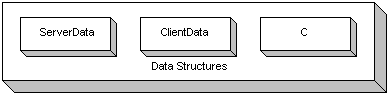
The
Scrabble game uses variables that must be shared by several classes. These
include the internet connection data (host name, socket for connection etc.),
the game data (player names, scores etc.) and some game constants.
There
are several classes that hold these variables in them, and these are: ServerData,
ClientData and C.
Each
class holds the information needed for the specific user.
C holds all the constants
used in the game: prefixes for network messages, ServerData holds all
the data the server needs to run the game and handle connections, and ClientData
has the game data the client needs to know in order to play the game.
The
data structures in Scrabble are also used by classes to notify other classes
that: they finished a job, or that they want a job to be made. This method was
used along with event handling and outside method calling, to insure fluent
running of a class without the need to block over a variable. This helps
simplify the MultiServer and ClientHandler class, that need to
pass messages between each other.
For
instance, when MultiServer needs to tell ClientHandler to send
the game data because it was changed, it changes a variable in ServerData
for each ClientHandler. When ClientHandler sees that variable is
true, it sends the game data, and when it is finished, turns the variable
back to false to let MultiServer know that the game data has been
sent to the client.
In
order to create a ClientHandler in the Receptionist class, and to
hand it over to MultiServer later, a ClientHandler variable is
kept in ServerData, and when Receptionist finishes creating a ClientHandler,
it sends an event to MultiServer to pick up the ClientHandler,
and put it in its structure of ClientHandlers[ ]. This was needed, because
it wasn’t possible to create a socket, a DataInputStream and DataOutputStream
all separate, and then pass them to MultiServer so it can create a ClientHandler.
The problem is that the DataOutputStream and DataInputStream stop
responding, and further handling of the Client is not possible.
java.lang.Object
|
+----java.awt.Component
|
+----java.awt.Container
|
+----java.awt.Window
|
+----AboutDialog
The AboutDialog
class is a Window displaying information about the authors of the
‘Scrabble in Java’ application. The Window is placed right in the middle
of the screen, according to the current display resolution (800x600, 1024x768,
etc.).
The
class uses the animator algorithm (discussed earlier) to perform animation that
is composed of the images t1.gif,
t2.gif, ..., t15.gif (transparent gifs). The Window is created and shown
when the application is started (for about 2 seconds), and when ‘About...’
is chosen from the menus/toolbar. To close the Window, just click
on it with the mouse.
java.lang.Object
|
+----java.awt.Component
|
+----java.awt.Canvas
|
+----Board
The Board
class is a Canvas displaying the Scrabble playboard.
The
class uses the drag & drop algorithm
(discussed earlier), and is responsible for updating the playboard
graphics.
The
playboard itself is actually an image located in the file board.jpg, that is
displayed on the screen.
java.lang.Object
|
+----java.awt.Component
|
+----java.awt.Canvas
|
+----ButtonDescription
The ButtonDescription
class is a Canvas displaying a String using the paint() method.
The size of the Canvas changes so the String fits perfectly in
it.
For
example:

The
class is used in ToolBarPanel.java to display the description of the
different buttons in it.
java.lang.Object
|
+----C
This
class contains the constants used in Scrabble.
There
are certain integers used as prefixes in the communication protocol. These
constants participate in the communication protocol between the Client
and ClientHandler (that exchange messages between each other) and state
which data comes after them.
Other
constants contain prefixes for event handling, so with each special event, the
specific integer is used to identify the event.
A
special constant is C.MAX_NUM_OF_PLAYERS, that can be changed before
compilation to allow any maximum number of Clients.
java.lang.Object
|
+----java.awt.Component
|
+----java.awt.Container
|
+----java.awt.Panel
|
+----ChatArea
The ChatArea
class is a Panel containing all the GUI components that enables
communication between players.
Among
them are:
·
java.awt.List: list of all players.
· java.awt.TextField: line of text to be sent to
the selected player in java.awt.List.
· java.awt.TextArea: contains messages from
other players and from the Scrabble game itself.
java.lang.Object
|
+----CheckDictionary
The CheckDictionary
class handles word search in the dictionary. Given a word, the class
returns a boolean indicating if the
word is found in the dictionary. This
is done in the method: public boolean searchWord (String word).
The
class uses the dictionary algorithm (discussed earlier).
When
the class is created, the dictionary file - dictionary.dat - is being opened as
a read only java.io.RandomAccessFile.
java.lang.Object
|
+----java.awt.Component
|
+----java.awt.Container
|
+----java.awt.Window
|
+----java.awt.Dialog
|
+----CheckWords
The CheckWords
class is used when the players decide to play ‘Scrabble in Java’ without a
dictionary. Given an array of Strings,
the class displays them inside a ScrollingPanel in a modal unresizeable Dialog
that is placed in the middle of the application’s Frame, as checked java.awt.Checkboxes.
Then the server player unchecks the invalid words, and press the Ok Button.
If at least one java.awt.Checkbox was unchecked, the whole move is
considered illegal. 2 booleans indicates to the MultiServer class
if the check was ended, and if the move
was legal. This way the MultiServer doesn’t have to wait to the closing
of the Dialog, and can handle other tasks in the meantime.
java.lang.Object
|
+----java.awt.Component
|
+----java.awt.Container
|
+----java.awt.Window
|
+----java.awt.Dialog
|
+----ChooseDialog
The ChooseDialog
class creates a modal unresizeable Dialog, placed in the middle of
the application’s Frame. The Dialog enables the player to choose
a letter for the joker tile, when it is placed on the playboard. All the
letters are displayed inside a list Spinner, so in order to change the
chosen letter, the player clicks on the up/down arrows image buttons with the
mouse.
java.lang.Object
|
+----java.lang.Thread
|
+----Client
The Client class is created in order to make
a connection to the server, to make data transfer available between the server
and the Client.
During the entire existence of the Client
object, it listens for prefixes sent by the ClientHandler, and acts
accordingly. The prefixes can express a String message, a connection -
disconnection message, turn management messages, and some other.
java.lang.Object
|
+----ClientData
This
class is used by Client.
It
contains the data needed for connection to a server, and the game data that is
received from the server.
·
Two
structure of C.MAX_NUM_OF_PLAYERS elements, that hold the nicks of the players
connected and if the current index contains a valid player.
·
A
15*15 char array containing the current board letters, including the new ones
placed by the current player.
·
A
15*15 boolean array that states whether a square has a new letter or an old
one. This array is needed for drawing the new board letters in a different
color. This is needed, because when the client finishes its turn, and sends the
new board he made to the server the server needs to check it. If the move
wasn’t legal, the server sends an error message to the client, and the client
needs to reset the board. This is also needed if the client wants to undo the
move, or pass the turn. In this case, the new letters are put back in the
letter bank.
·
Data
concerning the game: whose turn is it, the last score, bank letters.
·
The
data of the game: time limit, is speller used, is time limit used.
·
Connection
data : host name, socket, connection time out.
java.lang.Object
|
+----java.lang.Thread
|
+----ClientHandler
The ClientHandler
handles game management and the Client. It receives it’s text messages,
disconnecting messages, and when the client turn begins, the ClientHandler
sends it bank letters, and when a Client finishes it’s turn, it sends
the turn status
If the socket connection is lost due to any reason,
or the Client chooses to disconnect, all connection ports are closed, and the
player is disconnected.
When a Client sends a message, the ClientHandler
sends it to the MultiServer, and the MultiServer decides to whom
to send it. The MultiServer then tells the appropriate ClientHandlers
to send the message sent.
java.lang.Object
|
+----java.awt.Component
|
+----java.awt.Container
|
+----java.awt.Window
|
+----java.awt.Dialog
|
+----ClientOrServer
The ClientOrServer
class creates a modal unresizeable Dialog, placed in the middle of
the application’s Frame. The Dialog appears when the player
presses the connect image button in the toolbar. The Dialog enables the
player to choose the way of connection - as a server or as a client, by
displaying 2 radio buttons (java.awt.Checkboxes that are grouped
together using java.awt.CheckboxGroup), and an Ok button.
java.lang.Object
|
+----java.awt.Component
|
+----java.awt.Container
|
+----java.awt.Window
|
+----java.awt.Dialog
|
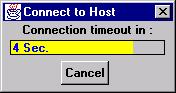
+----ConnectDialog
The ConnectDialog
class creates a modal unresizeable Dialog, placed in the middle of
the application’s Frame. The Dialog appears when the player tries
to connect as a server or a client. It displays a ProgressBarTimer, showing
the remaining time for trying to
establish connection between server and client, and a cancel Button.
When the time is up, or the cancel Button is pressed a boolean flag - ClientData.timeOutReached
- is raised, telling the Client class to stop trying to connect to
the server of the game.
java.lang.Object
|
+----java.awt.Component
|
+----java.awt.Canvas
|
+----ImageButton
The
image buttons were discussed earlier in the Main Algorithms section.
The ImageButton
class is a Canvas displaying an image with a 3D rectangle around
it. The Canvas is painted
according to the state of the boolean isButtonRaised, in order to give
the effect of a button.
When
a MOUSE_DOWN Event is caught, isButtonRaised is set to false,
and repaint() is called.
When
a MOUSE_UP Event is caught, isButtonRaised is set to true,
and repaint() is called.
In
addition, the button can be disabled/enabled. The constructor of ImageButton
requires 2 images: enabled button image + disabled button image, so the
appropriate image will be displayed according to the state of the button
(disabled/ enabled).
When
a MOUSE_ENTER Event is caught, a Timer for 0.5 seconds is
created. If an Event from the Timer
is caught, before a MOUSE_EXIT Event is caught, that means that the
mouse was on the image button for a while, and a representative Event is
thrown. This can be used to display a short description of the button, like in ToolBarPanel.java.
java.lang.Object
|
+----Mail
The Mail
class is a basic data structure consisting of 2 fields:
1.
String message: the message to be sent.
2.
int toWhom:
the ClientHandler index of the player the message is sent to. If the
message is sent to all players, toWhom = -1.
When
a player is sending a message to other player/players, the ChatArea
class throws an Event that looks like:
new Event(this,
Event.ACTION_EVENT, new Mail(message,toWhom))
java.lang.Object
|
+----java.lang.Thread
|
+----MultiServer
This class is responsible
for all the ClientHandlers : Who needs to be disconnected, who should
send game data, and all the game management requirements.
The MultiServer is
created when a player chooses to connect as a server. Then it creates a Receptionist
object that listens for connections from Clients.
When a ClientHandler
is created by the Receptionist, it is passed to the MultiServer,
which starts it and tells it to send the game data to the Client.
The MultiServer waits
in the background for the game to start. All the connection and communication
management, including messages between clients, is managed by this class in the
handleEvent method.
When a game is started, the MultiServer
enters the game handling loop. If the game isn’t a loaded one, no preordering
is made. If the game wasn’t loaded, the order of the players is randomly
determined, and the first player in the order gets the first turn.
All turn events : pass,
done, the time limit has been reached, arrives to MultiServer through
the appropriate ClientHandler. The MultiServer acts according to
the game rules.
In
the case of done, the MultiServer checks the correctness of the board (
whether a dictionary is used or not).
If the game needs to be
stopped, an event arrives from the Receptionist, and MultiServer
tells all the ClientHandlers to end the game.
Almost
the same happens if the player wants to close the server, except that the MultiServer,
Receptionist and all ClientHandlers will be closed.
java.lang.Object
|
+----java.awt.Component
|
+----java.awt.Canvas
|
+----PlayerName
The PlayerName
class is a Canvas displaying a String representing a player
nick name.
The String
can be displayed in 2 ways:
1.
painted
in black.
2.
painted
in red, with an animation of a moving arrow next to it. (this is done using the
animator algorithm that was discussed earlier).

This
is used to tell all the players whose turn is it.
java.lang.Object
|
+----java.awt.Component
|
+----java.awt.Canvas
|
+----ProgressBarTimer
The ProgressBarTimer
is a Canvas displaying the remaining time of a timer (in the form of
a progress bar). The update() method paints the canvas according to the
remaining time in seconds. A Timer
is created to throw events rapidly every 1 second. When an Event from
the Timer is caught, the remaining time is decreased by 1, and the repaint()
method is called. When the time reaches zero, the class throws Event.ACTION_EVENT.
The ProgressBarTimer
look likes:

java.lang.Object
|
+----java.awt.Component
|
+----java.awt.Container
|
+----java.awt.Window
|
+----java.awt.Dialog
|
+----PropertiesDialog
The PropertiesDialog
class creates a modal unresizeable Dialog, placed in the middle of
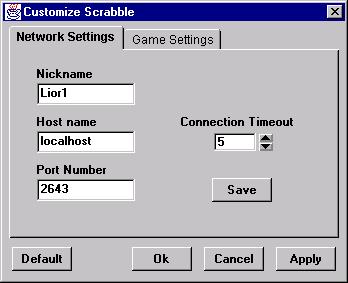
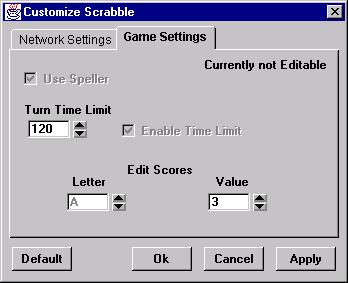
the application’s Frame. The Dialog is used for changing network
and game settings.
In
the Dialog there are 2 Panels, one for network settings, and the
other for game settings. Both of them are added to symantec.itools.awt.TabPanel
in order to provide a tabbed dialog effect.
The
network setting can be saved using a Save Button. By doing so, they
become the default network settings, and will be used whenever ‘Scrabble in
Java’ is started, or the Default Button is pressed.
In
addition, there are also the Ok, Cancel and Apply Buttons.
java.lang.Object
|
+----java.awt.Component
|
+----java.awt.Container
|
+----java.awt.Window
|
+----java.awt.Dialog
|
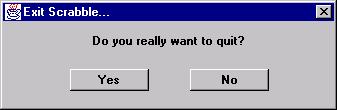
+----QuitDialog
The QuitDialog
class creates a modal unresizeable Dialog, placed in the middle of
the application’s Frame. The Dialog appears when the player wants
to close the ‘Scrabble in Java’ application. If the player decide to quit (Yes Button),
a WINDOW_DESTROY Event is thrown to the Scrabble class. If the
player decide to continue playing scrabble (No Button), the hide() method
is called.
java.lang.Object
|
+----java.lang.Thread
|
+----Receptionist
The Receptionist is waiting for new
connections. When a new Client connects to the ServerSocket, Receptionist
checks to see if he’s not beyond the maximum number of players. If he is, he
gets re appropriate message and disconnects.
If
the connection proceeded ok, the Receptionist creates a ClientHandler
to deal with the client.
The Receptionist
can also get a connection from Scrabble itself, which sends a message that the ServerSocket
should stop listening for connections and close up. This is because that in jdk
1.0.2 you can’t stop a thread that is listening and expect for the ServerSocket
to be closed to, and if you try to close it from the outside, the computer gets
“stuck”. The only way to stop the accept() method is to connect to the ServerSocket
(and thus exiting the accept() method).
After the Receptionist created the ClientHandler,
it sends an event to MultiServer to place it in its array of ClientHandlers,
and to start the thread.
java.lang.Object
|
+----java.awt.Component
|
+----java.awt.Canvas
|
+----Score
The Score
class is a Canvas used for displaying the player’s total score. It is
done using the update()&repaint() methods.
The Canvas looks like:
java.lang.Object
|
+----java.awt.Component
|
+----java.awt.Container
|
+----java.awt.Panel
|
+----ScoreOfPlayers
The ScoreOfPlayers class is a Panel
containing 2 sections:
1.
Score details: contains the score and composed words
of each turn during the game. This data is placed inside a symantec.itools.awt.MultiList.
The MultiList is placed inside a ScrollingPanel. Whenever a new
line is added to the MultiList, it is being resized to its preferred
size. That way, if the MultiList is too big, scroll bars will appear.
2.
Total scores: contains the ScorePanel
class.
The
2 sections are placed in the Panel using BorderLayout.
The
class has methods for clearing both sections (used when starting a new game),
and for removing the TurnTimer.
java.lang.Object
|
+----java.awt.Component
|
+----java.awt.Container
|
+----java.awt.Panel
|
+----ScorePanel
The ScorePanel
class is a Panel containing the nick names of the players, their total
scores, and a turn timer. There is no layout in this Panel (null
layout). The Panel size is changed to fit exactly to the components in
it. When a new game is started, the
class updates all its components.
The
class has methods for clearing the Panel, and for placing the turn timer
in its right place.
java.lang.Object
|
+----java.awt.Component
|
+----java.awt.Container
|
+----java.awt.Window
|
+----java.awt.Frame
|
+----Scrabble
The Scrabble
class is the main class of the application.
It
is a resizeable Frame containing a MenuBar and additional 3
sections, that are arranged in a BorderLayout layout.
Those
sections are:
1.
ToolBarPanel
2.
symantec.itools.awt.SplitterPanel, containing the scrabble playboard, the
score area, and the chat area.
3.
StatusBarPanel
This
class is supervisor of all the player movements, and all the functions the user
chooses, whether he is a client or a server.
All
the GUI actions of the player pass through Scrabble and continue to the
appropriate class for handling.
The
functionality of this class changes if the user has connected as a server or as
a client. If the user is a server, then several options are enabled for his
use, and they are disabled if he is a client.
This
Scrabble class communicates with MultiServer through Receptionist
by connecting to it as a client and delivering a message. The communication
with other classes is done by changing global variables, or by activating
methods.
java.lang.Object
|
+----java.awt.Component
|
+----java.awt.Container
|
+----java.awt.Panel
|
+----ScrabbleBoard
The ScrabbleBoard
class is a Panel containing the scrabble playboard (the Board
class) and 3 image buttons representing Done, Pass and Undo, all arranged in a
null layout. It includes methods for handling Events from those buttons.
The resize() and reshape() methods are overridden so the Panel
size will remain always the same - 580x590 (the same as the size of the
playboard – the Board Canvas).
java.lang.Object
|
+----java.awt.Component
|
+----java.awt.Container
|
+----java.awt.Panel
|
+----ScrollingPanel
The ScrollingPanel
class is a Panel containing
a sub-Panel, horizontal Scrollbar and vertical Scrollbar,
arranged in a BorderLayout layout.
Given
a Panel (as a constructor parameter), the class adds it to the sub-Panel and uses the scrollbars
algorithm (discussed earlier) to
determine whether to add /remove scrollbars, and how to handle them.
java.lang.Object
|
+----ServerData
This
class contains variable used by : MultiServer, ClientHandler, Scrabble and
Receptionist.
This
class contains the data needed for the Scrabble server program to run. It
contains all data about the clients connected, the board data, scores, bank
letters, and the internet connection data.
The
different data structures in ServerData are as follows:
·
A
structure of C.MAX_NUM_OF_PLAYERS elements, which contains all the data about
the clients that connected: is the current space is occupied by an active ClientHandler or not, what
is the nick of the player etc.
·
A
structure of C.MAX_NUM_OF_PLAYERS elements, which contains the current game
data for each valid player: bank letters, score and players order.
·
Two
structures of 15*15 chars, containing the board game before the current turn
ended, and a board that contains the letters after the turn ended, and that
allow easy checking of the validity of the board game.
·
A
structure of 15*15 booleans, that state whether a square has a new letter on it
or not. This also helps makes the board checking easier.
·
A
structure of 15*15 constant ints, that contain the type of each board square :
double letter, tripple word etc. This structure is used to calculate the
players score at the end of the turn.
·
For
security, the bank letters of each player are kept in the ServerData,
and checked each time a player ends his turn. If the letters put on the board
were not in the bank letter in the first place, an error message is sent to the
player. When a game is loaded, this is where the bank letters are read into.
·
Scrabble
needs to communicate with MultiServer without disturbing the fluent game
handling. To accomplish this, several variables have been used to indicate if
Scrabble wants something to be done.
·
Different
kinds of data are also kept in ServerData : who is the winner, client to
be kicked, whose turn is it etc.
java.lang.Object
|
+----java.awt.Component
|
+----java.awt.Container
|
+----java.awt.Panel
|
+----Spinner
The Spinner
class is used for creating list spinners or numeric spinners. It consists of a TextField
and 2 ImageButtons.
The
list spinner is given an array of Strings, and it displays the first String
in the TextField. When an Event from one of the buttons is caught, the
String that is displayed in the TextField is changed to the previous or next String in the array (according
to the pressed button).
The
same is for the numeric spinner, except that instead of displaying Strings,
sequential numbers, ranging between given minimum and maximum values, are being displayed.
A Spinner looks
like:
java.lang.Object
|
+----java.awt.Component
|
+----java.awt.Container
|
+----java.awt.Panel
|
+----StatusBarPanel
The StatusBarPanel
is a Panel that looks like a status bar.
Using
a GridBagLayout, the class layout 6 StatusField classes, each
containing certain displayed information.
One
of the StatusFields displays a clock or a time counter from the
beginning of a game. The StatusBarPanel updates this StatusField, using
the Timer class.
The
displayed text in the StatusFields can be changed at any time.
java.lang.Object
|
+----java.awt.Component
|
+----java.awt.Canvas
|
+----StatusField
The StatusField
class is a Canvas that displays a given String.
There
is a method for updating the text that is being displayed in the Canvas. This
method also changes the Canvas size so the displayed String
fits perfectly in it. Whenever a StatusField is being resized, the StatusBarPanel
is being re-layout using the layout() method.
java.lang.Object
|
+----Timer
The Timer
class is a thread that throws events rapidly each time a predefined time
passes. The Timer algorithm was discussed in detail earlier (Main
Algorithms section).
java.lang.Object
|
+----java.awt.Component
|
+----java.awt.Container
|
+----java.awt.Panel
|
+----ToolBarPanel
The ToolBarPanel
is a Panel, containing ImageButtons (arranged in null layout)
with the same functionality as several MenuItems.
As
was mentioned earlier, if a mouse is on a button for a while (0.5 seconds), the
button throws an Event representing that. The ToolBarPanel
catches this Event and shows a small Canvas next to the button
with the button description (the ButtonDescription class).
When
the class catches an Event from a button that was pressed, it identifies
the pressed button, and throws a MenuItem Event to the
Scrabble class, as like instead of pressing the button, the MenuItem
itself was chosen.
java.lang.Object
|
+----java.awt.Component
|
+----java.awt.Canvas
|
+----TurnTimer
The TurnTimer
class is a Canvas that is used for displaying 2 things:
1.
The
game’s timer, during the game.
2.
A
blinking green “WINNER” String when a game was ended next to the winning
player.
Both
are implemented using the Timer class.
The Canvas
looks like:
·
symantec.itools.awt.MultiList
·
symantec.itools.awt.SplitterPanel
·
symantec.itools.awt.TabPanel
All
those classes are an extension of java.awt.Panel. Explanation on them
can be found in the Symantec Visual Café help files.
The toolbar enables
easy access to options from the menus that are usually used.
Contains
the following information:
·
Host
name and Port number.
·
Number
of players.
·
Clock
/ Time from beginning of game.
·
An
indicator : Connected / Not Connected.
·
An
indicator : Client / Server / None.
Contains
the following:
·
Send area: Enables the players to send text messages to each other. In order to
do so, just type your message in this area, and press the "Enter"
key.
·
Messages area: This area displays messages from other players, and from the Scrabble
game itself.
·
Choose Name area: This area contains the nick names of all players. By clicking on one
of them, the player can choose to whom to send a private text message.
Contains
the total score of all players. This area also tells to all players whose turn
it is: the current player nick is painted in red and an arrow points to it.
Contains
detailed information on each turn in the game: The player's name, the score
he/she achieved in the turn, and the composed words.
Contains
the following:
·
15x15
board - players place their tiles on it.
·
"Letters
Bank" that contains 7 tiles to be used by the players.
·
DONE,
PASS and UNDO buttons, that do the same as their corresponding in the Game
menu.
·
Save Game: Game
can be saved and continued later. Only the Server can save a game.
·
Load Game: Saved game can be loaded and continued under the following constraints:
-
Only
the Server can load a game.
-
All
the players from the saved game (and only them) are currently connected to the
Server.
-
There
is no game in progress.
The dialog window of the load game menu item is
similar to that of save game.
·
Save Messages: Saves the contents of the 'Messages' window to a selected file as plain
text. The dialog window of the save messages menu item is similar to that of
save game.
·
Clear Messages: Clear the contents of the 'Messages' window.
·
Exit scrabble: Exit
the application.
·
Start Game: Begin a new game. The order of the players is determined, and each
receives 7 randomly chosen letters. This option is available only to the Server
when there is no game in progress.
·
Stop Game: End the current game. This option is available only to the Server when
there is a game in progress.
·
Clear Playboard: Clears the playboard and the "letters bank" from tiles.
·
Kick Player: Disconnect player from server. This option is available only to the
server. You can kick the player you highlight in the text area.
·
Undo: Enables
the current player to undo his/her moves, by returning all 1-7 placed tiles to
the 'bank of letters'.
·
Pass: Enables
the current player to pass his/her turn, and to receive 7 new letters in the
next turn.
·
Done: Enables
the current player to finish his/her turn. The moves will be checked by the
server, and the player's score will be changed.
·
Client: Attempt to connect as a Client to a Scrabble Server. The connection
setup is done in the menu: Settings - Properties - Network Settings.
·
Server: Connect as a Scrabble Server. The connection setup is done in the menu:
Settings - Properties - Network Settings.
·
Disconnect: Disconnect
from Server.
·
Properties:
-
Network Settings:
Player's nickname, Host, Port, Connection timeout.
-
Game
Settings: Use speller, Use turn time limit, Turn time limit, Letters' values.
·
Browser location: Choose the path of your desired browser, in order to view the help
documentation. This opens the file dialog as in “save game”.
·
Toolbar: Check this menu item if you want a toolbar to be displayed.
·
Status bar: Check this menu item if you want a status bar to be displayed.
·
Help: View
the help documentation in your chosen browser.
·
About Scrabble: Information
about the program and the developers.
·
Several
players want to play Scrabble.
·
All
start the application.
·
All
choose their nick name in the Settings - Properties menu.
·
All
change the Host name and Port number in the Settings - Properties menu to be
the same as of the Server.
·
The
player who wants to be the Server selects: Connect as Server. All other select:
Connect as Client.
·
Now
all players are connected together and can chat between themselves. The
messages can be public or private.
·
The
Server player starts a new game. The order of the players in the game is random
·
Each
player receive 7 letters (tiles).
·
In
his turn, each player can compose words on the playboard using the 7 tiles.
When he finished, he can press Done. The words are submitted to the Server, who
performs the spell check. If the move is legal, the Server sends it to all
other players (with scoring). If the move is illegal, an appropriate message is
sent to the player.
·
If
the player can't compose any word, he can Pass his turn. The Server will then
send him 7 new letters, and will pass the turn to the next player.
·
The
game ends when the Server player decide to stop the Game.
·
The
winner is the one with the higher score.
There
are several problems using java.net.ServerSocket :
·
The
accept() method in this class doesn’t have an option for a time limit on
the listening, and thus the server stays awake for connections until some Client
makes a connection to it. If an attempt to close the Receptionist class
that is “stuck” on the accept(), the entire program gets stuck because the java.net.ServerSocket
cannot close.
·
In
later versions of JDK, the accept() method got a sister: accept( int
timeLimit) that listens for connections only during a time limit and
breaks. This enables the programmer to add a routine after each accept(int
timeLimit) period, that checks if the java.net.ServerSocket needs to
be closed. Now, the java.net.ServerSocket CAN be closed because it is
not in the accept() method.
·
In
order to solve the problem in JDK 1.0.2, since there is no such convenient
method, When we wanted to close the Receptionist class, we had to open a
ClientSocket and send it an int that indicates that the main program wants to
close the server.
When
a Dialog window is moved across the screen it erases its painted
background. Basically, this should not happen and the background should be repainted when the Dialog window is closed.
We solved this problem by calling to the repaint() method when each Dialog
window is closed.
The
first idea of how to implement drag & drop was by using a
java.awt.Window.
The idea
was to paint the dragged tile on a Window, and let Java handle the drag
problems.
The
problem was that a Window has a minimum size that is larger than the
size of a tile.
During
execution of the drag & drop algorithm, the MOUSE_DRAG event is
caught many times. At each time, a small image is created for erasing the last
tile position. At first, we used a local Image variable. This caused the
computer to crash as a result of low memory. This happened because this small
image was created many times, on and on, and the garbage collector couldn’t
keep up. We solved the problem by using this image as a private global variable
inside Board.java.
The
‘Scrabble in Java’ application was created using the JDK 1.0.2. During the
development time, new JDK versions were issued. Basically, Sun declared that
those new versions are backward compatible. In practice, this is not completely
true. We had many problems trying to convert from JDK 1.0 to JDK 1.1.
Several
other students in the lab experienced the same problems.
The
Java language is supposed to be platform independent. This was proved to be
wrong.
The
Scrabble program works fine in WINDOWS 95/NT, the environment we developed it
on.
When
we compiled and run our classes in the UNIX environment, the program doesn’t
work. We think that the Dialog windows that Scrabble opens are
the main cause for trouble. They appear odd on the screen, as if not
fully stretched, and the only thing left to do with the program is to kill it.
As
before, several other students in the lab experienced the same problems.
The
project was very helpful to our study of OOP, and improved our skills in
GUI and networking.
We
think that it would have been better for the Software lab students to start
working on the JDK 1.1 and above versions. That way they wouldn’t have to
burden themselves with very basic classes that don’t give the full control of
GUI, networking and event handling.
Finally,
we would like to give thanks to our supervisor, Dr. Ilana David, that gave us
helpful tips during the development of the project, and to the lab staff that
were there for us 24 hours a day, 7 days a week…
Lior Shadhan and Yaakov
Fruchtnis
The Scrabble in Java project